超越滚动视图:Scroll Target、Content Margin 与滚动转场
Beyond scroll views
2023年6月5日
一句话判断
SwiftUI 的 ScrollView 在 iOS 17 获得了分页对齐、容器相对布局、自定义滚动行为和滚动转场动画——终于可以替代大部分手写滚动逻辑了。
这场 Session 讲了什么
Harry 从 SwiftUI 团队出发,以 Colors App 的画廊功能为例,讲解了 ScrollView 的新 API:
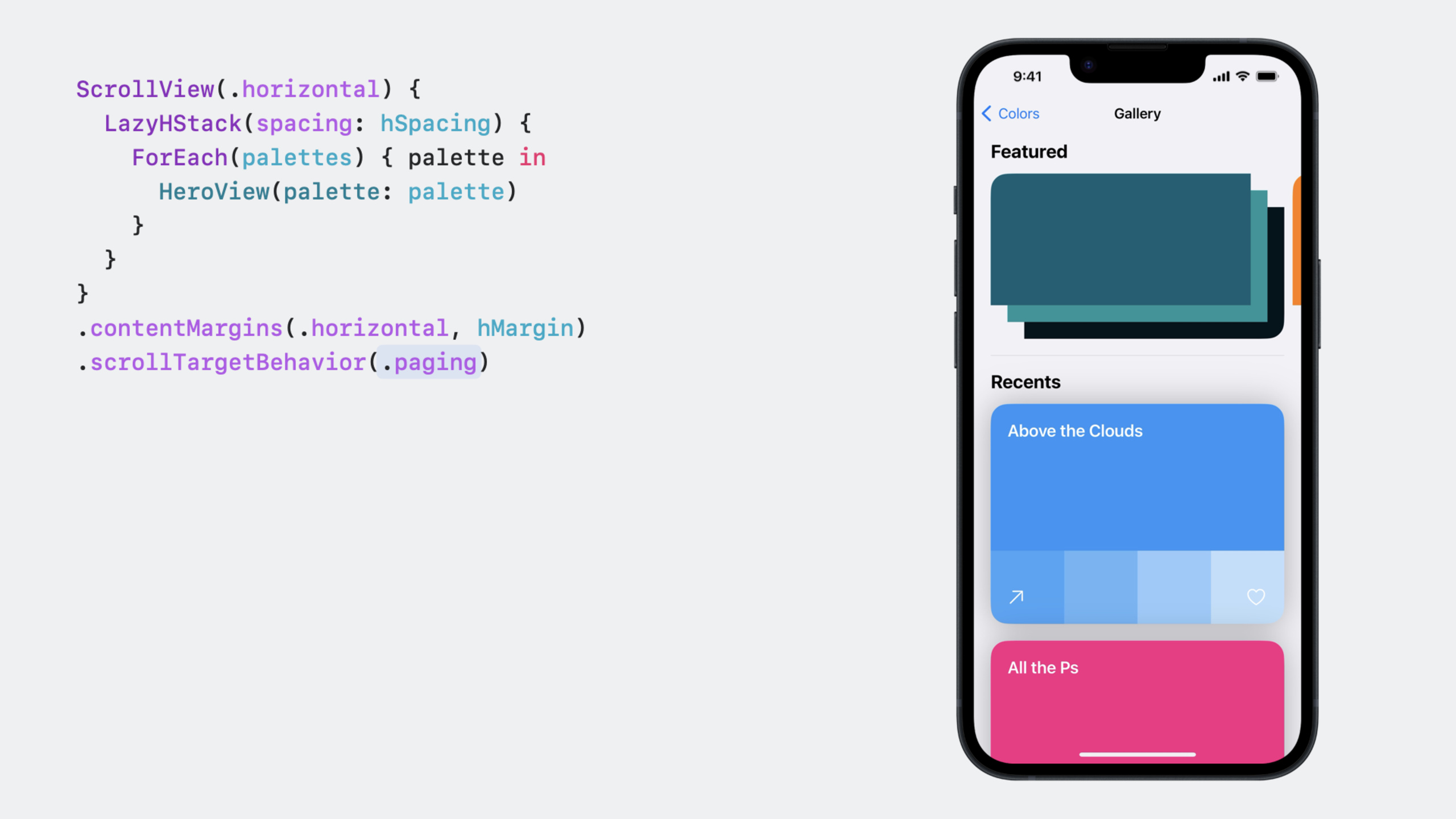
Content Margins。新增 .contentMargins() 和 .safeAreaPadding() 修饰符。普通 padding 会裁剪滚动内容,而 safeAreaPadding 让 ScrollView 占满宽度但内容有内边距,下一个元素可以”偷看”出来。contentMargins 还可以分别控制内容和滚动指示器的边距。
Scroll Target Behavior。.scrollTargetBehavior(.paging) 让 ScrollView 整页翻动;.scrollTargetBehavior(.viewAligned) 对齐到子视图。配合 .scrollTargetLayout() 标记 Lazy Stack 中的每个子视图为对齐目标。还可以实现自定义的 ScrollTargetBehavior 协议。
Container Relative Frame。.containerRelativeFrame(.horizontal) 让视图宽度基于最近的容器(ScrollView、NavigationSplitView 列、窗口),而不是整个屏幕。配合 count 和 spacing 参数轻松创建网格布局,用 horizontalSizeClass 区分设备。
Scroll Position。新的 ScrollPosition 类型让你观察和控制 ScrollView 的内容偏移量,替代了旧版的 ScrollViewReader。
Scroll Transitions。.scrollTransition() 修饰符根据视图在 ScrollView 中的可见位置应用动画效果——进入、停留、离开三个阶段可以自定义。
值得深挖的点
View Aligned 行为的 Lazy Stack 兼容。用 .scrollTargetLayout() 而不是 .scrollTarget() 来标记 Lazy Stack 中的子视图。因为懒加载视图中,尚未创建的视图无法被标记,但 Layout 知道它将来会创建哪些视图。
自定义 ScrollTargetBehavior。实现 updateTarget 方法,接收当前的 target 和上下文信息。你可以基于 target 位置和手势方向来修改目标——比如当滚动接近顶部时强制滚到最顶。
containerRelativeFrame 的跨平台一致性。horizontalSizeClass 现在在所有平台上都可用,不再需要 #if os() 条件编译。iPhone 上单列、iPad 上双列的布局代码变得非常简洁。
代码片段
// 分页滚动 + 容器相对布局
ScrollView(.horizontal) {
    LazyHStack(spacing: 16) {
        ForEach(colors) { color in
            ColorView(color: color)
                .containerRelativeFrame(
                    .horizontal,
                    count: horizontalSizeClass == .regular ? 2 : 1,
                    spacing: 16
                )
                .aspectRatio(3/4, contentMode: .fit)
        }
    }
    .scrollTargetLayout()  // 标记子视图为滚动对齐目标
}
.scrollTargetBehavior(.viewAligned)  // 对齐到子视图
.contentMargins(.horizontal, 24)  // 内容边距
// 滚动转场动画
ColorView(color: color)
.scrollTransition { content, phase in
content
.scaleEffect(phase.isTopLeading ? 0.8 : 1.0)
.opacity(phase.isTopLeading ? 0.5 : 1.0)
}
// phase 有三个状态:topLeading(即将进入)、identity(可见)、bottomTrailing(即将离开)// 自定义滚动行为
struct SnapToTopBehavior: ScrollTargetBehavior {
func updateTarget(
_ target: inout ScrollTarget,
context: TargetContext
) {
// 如果接近顶部且是向上滑动,强制滚到最顶
if target.rect.minY < 100 && context.velocity.dy < 0 {
target.rect.origin.y = 0
}
}
}最佳实践
- 用
.safeAreaPadding()而不是.padding()来给 ScrollView 添加边距,避免内容被裁剪。 - Lazy Stack 中始终用
.scrollTargetLayout()而非.scrollTarget()标记滚动目标。 containerRelativeFrame配合horizontalSizeClass做跨设备布局。- 滚动转场动画要克制——微妙的缩放和透明度变化比大幅度的位移动画更自然。
- 用
contentMargins的scrollerContent参数单独控制滚动指示器的边距。
还有什么值得关注
scrollTransition的 phase 有isTopLeading和isBottomTrailing属性判断进入/离开方向ScrollPosition类型提供了比 ScrollViewReader 更精确的控制能力- 这些 API 在 iOS、iPadOS、macOS 和空间计算平台上都可用