捐赠 Intent 并扩展 App 的存在感
Donate intents and expand your app's presence
2021年6月9日
一句话判断
Intent 捐赠(Intent Donation)是让你的 App 在 Siri Suggestions、Spotlight 和 Shortcuts 中自动出现的机制——你不需要做 Shortcut,只要正确捐赠 Intent,系统就会替你推荐。
这场 Session 讲了什么
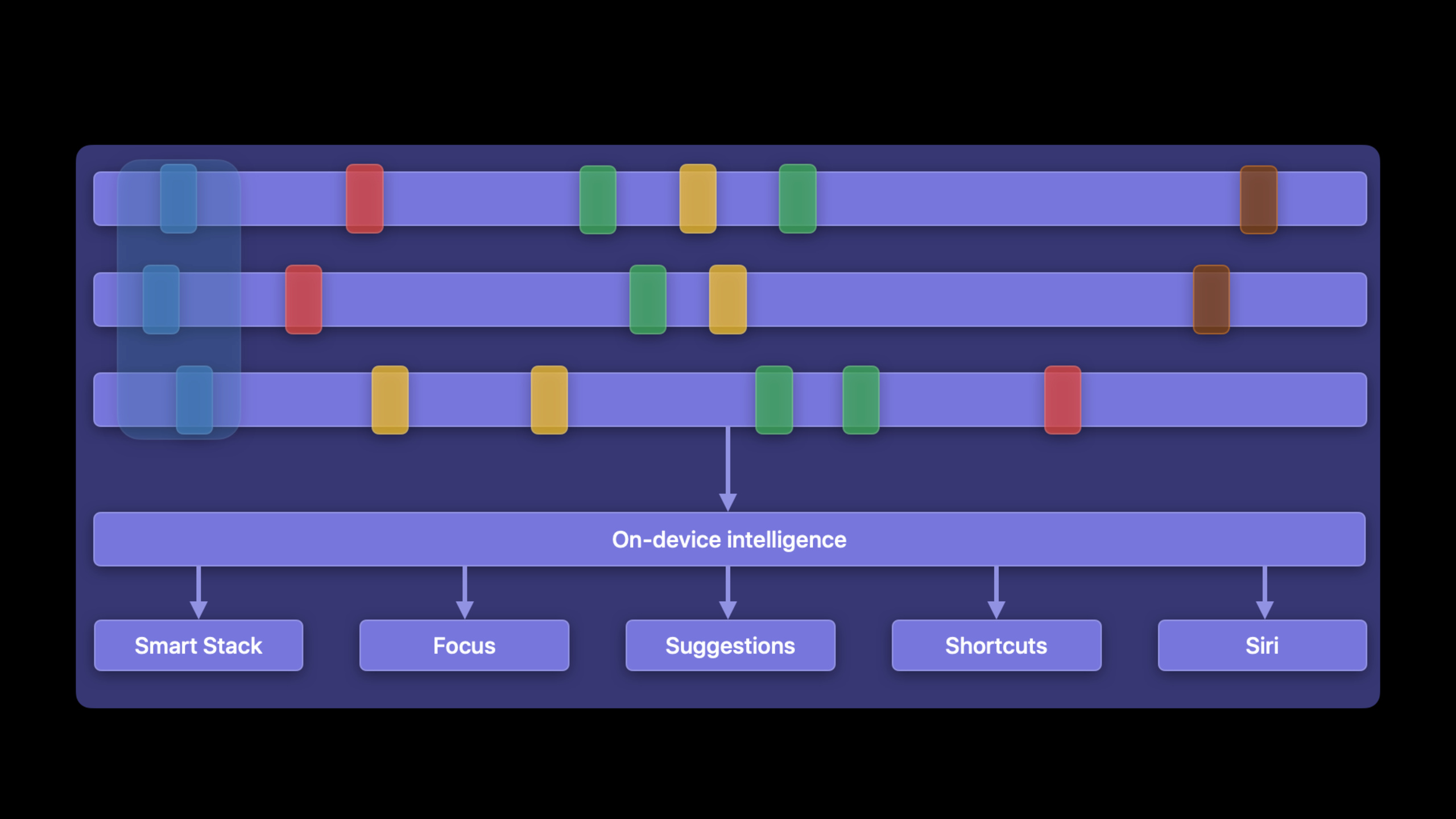
Session 讲解了如何通过 Intent Donation 扩展你的 App 在系统中的可见性。Intent Donation 的原理很简单:当用户在你的 App 中执行某个操作时,你把这个操作”捐赠”给系统。系统会学习用户的习惯,在合适的时间和地点通过 Siri Suggestions、Spotlight 搜索结果和锁屏建议自动推荐这个操作。
iOS 15 改进了 Intent 的处理方式,支持新的 App Intents 框架(虽然完整版在后续年份才推出)。Session 重点讲了如何用 INInteraction 和 INIntent 捐赠常见操作——发消息、打电话、导航、播放媒体、管理待办事项等。
还介绍了如何通过 INRelevantShortcutStore 主动向系统推荐你的 App 的快捷指令,以及如何利用 SiriKit 的词汇表(Vocabulary)让 Siri 更好地理解你的 App 特有的术语。
值得深挖的点
捐赠时机决定推荐质量
系统根据捐赠的上下文(时间、地点、设备状态)来决定何时推荐。如果你在错误的时机捐赠(比如用户取消操作后也捐赠),系统学到的模式就是错的。Session 强调只在用户成功完成操作后捐赠,并且附上准确的上下文信息——如果用户每天早上 9 点在公司打开你的 App 查看日报,捐赠时附上”工作日早上”的时间模式和”公司”的位置模式。
相关快捷指令的主动推送
INRelevantShortcutStore 让你可以主动告诉系统”这些快捷指令现在很相关”。比如一个咖啡 App 可以在用户靠近某家门店时,推送”点一杯拿铁”的快捷指令到 Siri Suggestions。这比被动等系统学习要快得多,但要控制推送频率——如果推太多无关的建议,用户会关闭 Siri Suggestions。
代码片段
捐赠一个发消息的 Intent
import Intents

func donateSendMessageIntent(to contact: String, message: String) {
    // 创建 Intent
    let intent = INSendMessageIntent(recipients: nil,
                                      content: message,
                                      speakableGroupName: INSpeakableString(spokenPhrase: contact),
                                      conversationIdentifier: "chat-\(contact)",
                                      serviceName: nil,
                                      sender: nil)

    // 创建 Interaction 并捐赠
    let interaction = INInteraction(intent: intent, response: nil)
    interaction.donate { error in
        if let error = error {
            print("Intent 捐赠失败: \(error)")
        }
    }
}
推送相关的快捷指令
import Intents

func pushRelevantShortcuts() {
    // 创建快捷指令
    let shortcut = INShortcut(intent: orderCoffeeIntent)
    let relevantShortcut = INRelevantShortcut(shortcut: shortcut)

    // 设置相关上下文(比如地理位置)
    let location = INRelevantShortcutLocation(region: CLCircularRegion(
        center: CLLocationCoordinate2D(latitude: 39.9, longitude: 116.4),
        radius: 500, identifier: "Office"))
    relevantShortcut.shortcutRole = .order
    relevantShortcut.relevanceProviders = [location]

    // 推送到系统
    INRelevantShortcutStore.default.setRelevantShortcuts([relevantShortcut]) { error in
        if let error = error {
            print("推送相关快捷指令失败: \(error)")
        }
    }
}
捐赠播放媒体的 Intent
// 用户播放一首歌时捐赠
func donatePlayMediaIntent(song: Song) {
    let mediaItem = INMediaItem(
        identifier: song.id,
        title: song.title,
        type: .song,
        artwork: INImage(imageData: song.artworkData)
    )

    let intent = INPlayMediaIntent(
        mediaItems: [mediaItem],
        mediaContainer: nil,
        playShuffled: false,
        playbackRepeatMode: .none,
        resumePlayback: true
    )

    let interaction = INInteraction(intent: intent, response: nil)
    interaction.donate()
}
最佳实践
捐赠策略: 只在用户成功完成操作后捐赠。捐赠时附上尽可能完整的元数据——标题、副标题、图片、时间、位置。不要过度捐赠,每个操作一次就够了,重复捐赠不会增加推荐权重。
快捷指令设计: 为最常见的用户操作创建快捷指令模板。用 INRelevantShortcutStore 在合适的上下文中主动推送。提供清晰的快捷指令标题和描述,让用户在 Shortcuts App 中一眼知道这个指令做什么。
还有什么值得关注
- iOS 15 的 Spotlight 搜索结果现在会展示捐赠过的 Intent 操作。
- Siri Event Suggestions 可以把你的 App 的活动自动添加到日历。
- 新的 App Intents 框架是未来方向,简化了 Intent 的定义流程。