初识 Swift 中的 async/await
Meet async/await in Swift
2021年6月7日
一句话判断
Swift Concurrency 的 async/await 不只是语法糖——它从根本上改变了异步代码的编写心智模型,是 Swift 语言演化中自 optional 之后最重大的变革。
这场 Session 讲了什么
这个 Session 是 Swift 5.5 引入的 async/await 特性的完整介绍。从最基础的异步函数声明讲起,逐步展开到异步序列(AsyncSequence)、任务结构(Task)、以及如何将现有的 completion handler 风格 API 迁移到 async/await。
在 async/await 之前,Swift 的异步编程主要依赖闭包回调(Completion Handler)和 GCD(Grand Central Dispatch)。这导致了严重的”回调地狱”(Callback Hell):错误处理分散、代码缩进层层嵌套、执行顺序难以追踪。async/await 用线性的代码结构解决了这些问题——异步代码看起来和同步代码一样直观。Session 特别强调了 Swift 的 async/await 不是简单的 C# 或 JavaScript 移植,而是深度整合了 Swift 的类型系统和错误处理机制:throws 和 async 可以自然组合,编译器帮你保证错误不会遗漏。
值得深挖的点
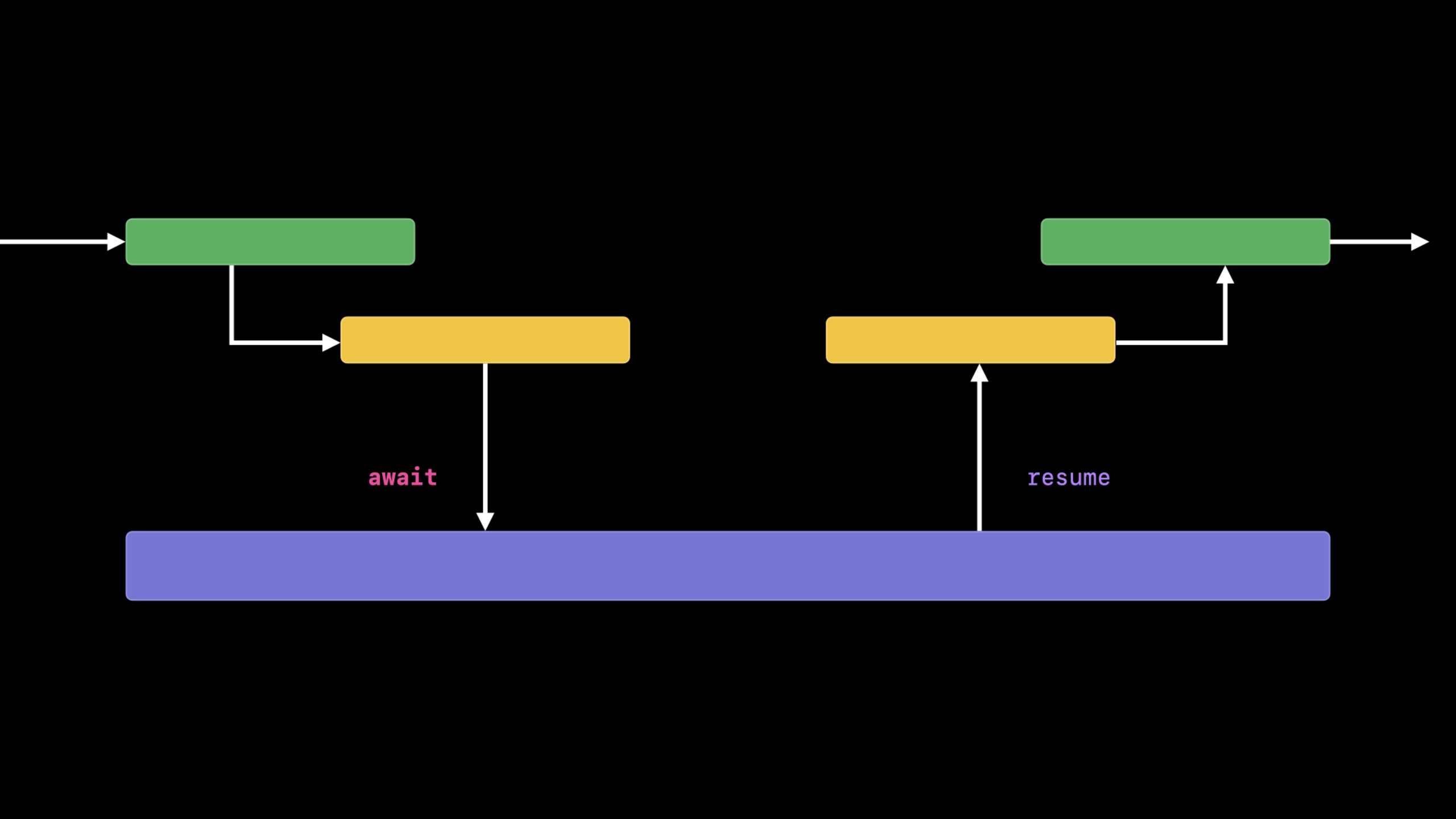
Continuation:连接旧世界和新世界的桥梁
withCheckedContinuation 和 withUnsafeContinuation 是迁移现有代码的关键工具。它们让你把一个 completion handler 风格的 API 包装成 async 函数,而不需要修改底层实现。Checked 版本会在运行时检查 continuation 是否被恰好调用一次——调用了两次会 crash,一次没调用会泄漏。这个安全网在迁移期非常实用。
AsyncSequence:异步世界的序列抽象
AsyncSequence 是 Sequence 的异步版本,让你可以用 for await 语法遍历异步产生的值流。这不是一个简单的协议包装,而是一整套异步迭代的基础设施。AsyncThrowingSequence 还能处理迭代过程中抛出错误的场景。URL 的 bytes 属性就是一个内置的 AsyncSequence 实现——你可以用 for await byte in url.bytes 逐字节异步读取网络数据。
代码片段
// 基础 async/await 用法
// 对比旧的 completion handler 风格,代码结构清晰得多
func fetchWeather(for city: String) async throws -> Weather {
    let url = URL(string: "https://api.weather.com/\(city)")!
    let (data, response) = try await URLSession.shared.data(from: url)

    guard let httpResponse = response as? HTTPURLResponse,
          httpResponse.statusCode == 200 else {
        throw WeatherError.invalidResponse
    }

    return try JSONDecoder().decode(Weather.self, from: data)
}

// 调用异步函数——不再需要嵌套闭包
do {
    let weather = try await fetchWeather(for: "Beijing")
    print("北京今天 \(weather.temperature)°C")
} catch {
    print("获取天气失败: \(error)")
}
// 使用 Continuation 包装现有 completion handler API
func loadImage(from url: URL) async -> UIImage? {
await withCheckedContinuation { continuation in
// 将旧的闭包 API 桥接为 async 风格
ImageDownloader.shared.download(url) { image in
continuation.resume(returning: image)
}
}
}
// 实际使用
if let avatar = await loadImage(from: avatarURL) {
self.profileImageView.image = avatar
}// AsyncSequence 的实际应用——逐行读取文件
func processLogFile(_ url: URL) async throws {
// url.lines 是内置的 AsyncSequence
for await line in url.lines {
guard line.contains("ERROR") else { continue }
let errorEntry = try parseErrorLog(line)
await notifyMonitoringSystem(errorEntry)
}
}最佳实践
- 迁移优先级:先把最外层的”组装逻辑”改成 async/await(比如一个调用多个网络请求的函数),底层工具函数可以暂缓。这样收益最大,改动最小。
- 不要在
withCheckedContinuation里做耗时操作——continuation 的 resume 应该在原始闭包被回调时立刻执行,中间不要插入额外逻辑。 Task.init和Task.detached的选择:大多数情况用Task.init,它会继承当前 actor 的上下文;只在明确需要脱离所有上下文时才用Task.detached。
还有什么值得关注
async let可以并发发起多个异步操作,适合”同时请求三个接口,等全部返回”的场景,比手动创建 Task 更简洁。- Xcode 13 内置了将 completion handler 自动转换为 async/await 的 refactoring 工具,在编辑器中右键即可触发。
- Swift 5.5 的 concurrency 特性需要部署目标至少是 iOS 15 / macOS 12,暂时无法回退支持旧系统。