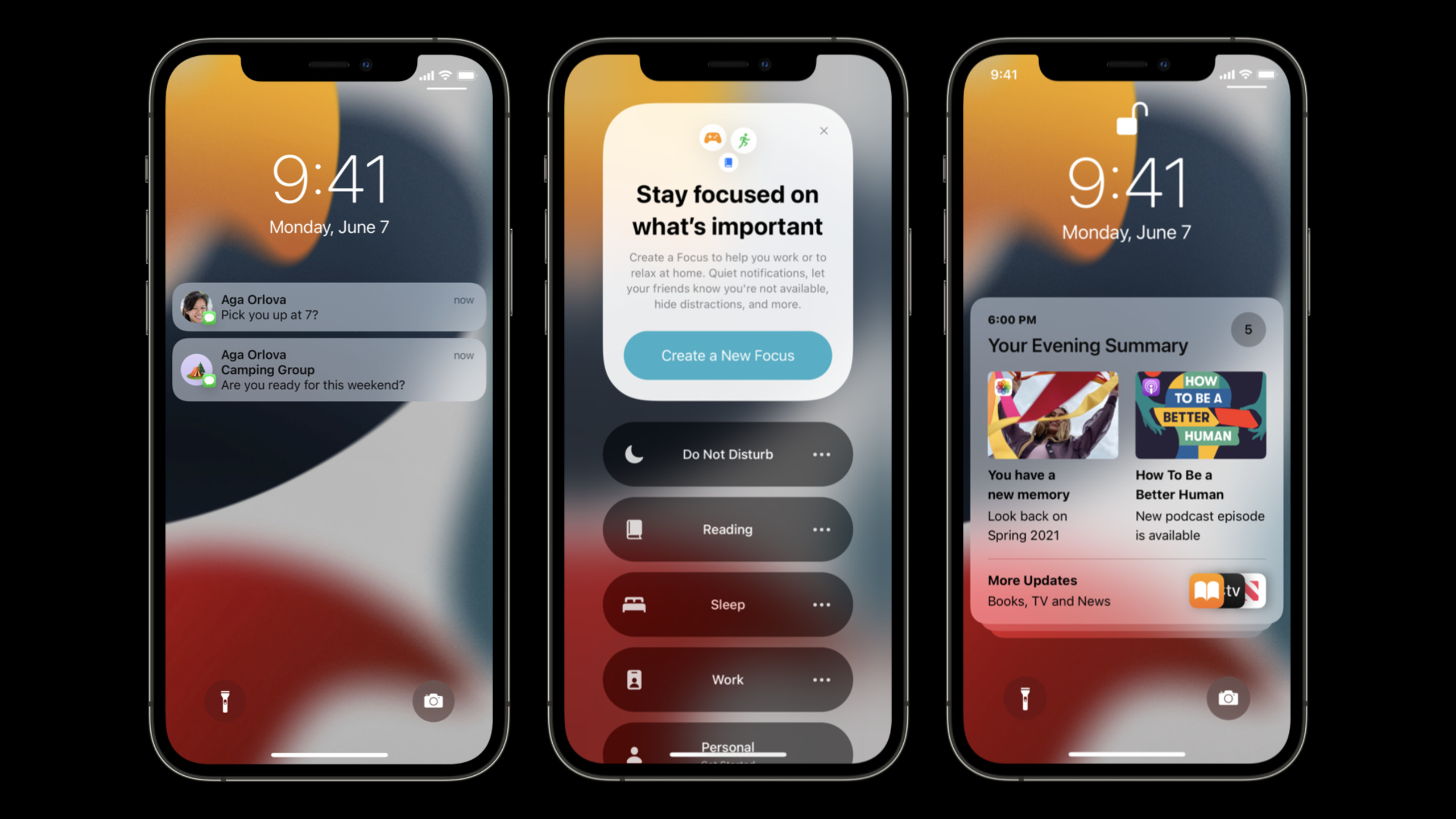
发送通讯类和时效性通知
Send communication and Time Sensitive notifications
2021年6月9日
一句话判断
iOS 15 的通知系统被彻底重新设计 —— 通讯通知(Communication Notifications)让消息类 app 获得系统级 VIP 待遇,而时效性通知(Time Sensitive Notifications)终于可以绕过专注模式,但苹果手里握着审核权。
这场 Session 讲了什么
iOS 15 对通知系统做了两个重要分类:通讯类通知和时效性通知。
通讯通知(Communication Notifications)是专为即时通讯、邮件等场景设计的。通过 UNNotificationContent 的 addCommunicationContent 方法,你可以告诉系统”这是一条来自某个联系人的消息”。系统会在通知中展示发送者的头像和名字(从 Contacts 框架获取),即使 app 被用户设置为静默通知,通讯通知仍然可以在焦点模式下突破。
时效性通知(Time Sensitive Notifications)适用于”必须立刻看到”的场景:安全警报、到站提醒、账户异常等。通过在 payload 中设置 interruption-level: time-sensitive,这类通知可以绕过专注模式的静默规则。但苹果明确表示,这个权限会审核 —— 如果你的 app 滥用它推送营销消息,会被吊销。
Session 还讲解了 Notification Summary(通知摘要)的工作机制,以及如何设置 app 的”重要性评分”来影响摘要排序。
值得深挖的点
通讯通知的联系人解析链路。当你设置 INPerson 作为发送者时,系统会尝试匹配用户通讯录中的联系人。匹配成功后,通知会显示通讯录中的照片和名称,而不是你传入的原始数据。如果匹配失败,使用你提供的 INPerson 的 avatar。这意味着你的 app 需要正确设置 INPerson 的 personHandle(邮箱或电话号码)才能触发匹配。
时效性通知的审核门槛。苹果在开发者文档中列出了允许使用时效性通知的场景:家庭安全、健康提醒、航班变更、日历事件等。购物促销、社交互动更新、内容推荐等场景不允许使用。如果审核发现滥用,不仅是这个功能会被禁用,整个 app 的推送权限可能受影响。
代码片段
发送通讯类通知:
import UserNotifications
import Intents

func sendCommunicationNotification(from name: String, message: String) {
    let content = UNMutableNotificationContent()
    content.body = message
    content.sound = .default

    // 创建发送者信息
    let sender = INPerson(
        personHandle: INPersonHandle(value: "john@example.com", type: .emailAddress),
        nameComponents: nil,
        displayName: name,
        image: nil,
        contactIdentifier: nil,  // 留空让系统自动匹配通讯录
        customIdentifier: nil
    )
    // 标记为通讯通知
    do {
        let communicationContent = try INInteraction(
            intent: INSendMessageIntent(
                recipients: nil,
                outgoingMessageType: .outgoingMessageText,
                content: message,
                speakableGroupName: nil,
                conversationIdentifier: "chat_\(name)",
                serviceName: nil,
                sender: sender,
                attachments: nil
            ),
            response: nil
        )
        communicationContent.donate { error in
            if let error = error {
                print("通讯交互捐赠失败: \(error)")
            }
        }
    } catch {
        print("创建通讯通知失败: \(error)")
    }

    let request = UNNotificationRequest(
        identifier: UUID().uuidString,
        content: content,
        trigger: nil  // 立即发送
    )
    UNUserNotificationCenter.current().add(request)
}发送时效性通知:
import UserNotifications

func sendTimeSensitiveNotification(title: String, body: String) {
    let content = UNMutableNotificationContent()
    content.title = title
    content.body = body
    content.sound = .defaultCritical  // 紧急提示音
    // 设置时效性中断级别
    content.interruptionLevel = .timeSensitive

    let request = UNNotificationRequest(
        identifier: UUID().uuidString,
        content: content,
        trigger: nil
    )
    UNUserNotificationCenter.current().add(request) { error in
        if let error = error {
            print("时效性通知发送失败: \(error)")
        }
    }
}配置通知分类和操作:
import UserNotifications

func setupNotificationCategories() {
    // 定义通知操作按钮
    let replyAction = UNTextInputNotificationAction(
        identifier: "REPLY_ACTION",
        title: "回复",
        options: [],
        textInputButtonTitle: "发送",
        textInputPlaceholder: "输入回复..."
    )
    let category = UNNotificationCategory(
        identifier: "MESSAGE_CATEGORY",
        actions: [replyAction],
        intentIdentifiers: [],
        options: .customDismissAction
    )
    UNUserNotificationCenter.current().setNotificationCategories([category])
}
最佳实践
- 即时通讯 app 必须接入通讯通知。它不仅改善通知外观,更重要的是在专注模式下能突破静默 —— 这直接影响用户的消息到达率。
- 时效性通知要严格限定在”用户不立刻知道就会产生实质损失”的场景。日历提醒、安全警报可以用;新闻推送、社交点赞绝对不能用。
- 配合 Notification Summary 优化 app 的”重要性评分”。通过
UNNotificationContent的relevanceScore(0-1)设置通知的重要程度,影响它在摘要中的排序。
还有什么值得关注
- iOS 15 引入了 Scheduled Notification Summary(定时通知摘要),用户可以选择在特定时间集中查看非紧急通知。
- 通讯通知支持 SiriKit 的
INSendMessageIntent,Siri 可以直接在通知上回复消息。 interruptionLevel有四个级别:.passive(不亮屏)、.active(默认)、.timeSensitive(突破专注)、.critical(突破静音,需要特殊权限)。