认识 AsyncSequence
Meet AsyncSequence
2021年6月10日
一句话判断
AsyncSequence 是 Swift Concurrency 对「异步数据流」的回答——如果你之前用 Combine 的 Publisher 或者 delegate 回调来处理异步事件流,现在有了更直觉的 for-await-in 写法。
这场 Session 讲了什么
AsyncSequence 是 Swift 5.5 引入的核心协议,它是同步 Sequence 的异步等价物。就像 for item in sequence 遍历同步序列一样,for await item in asyncSequence 可以遍历异步产生的元素。
Session 系统性地讲解了 AsyncSequence 协议的设计、系统框架中已有的 AsyncSequence 实现,以及如何自己创建自定义的 AsyncSequence。
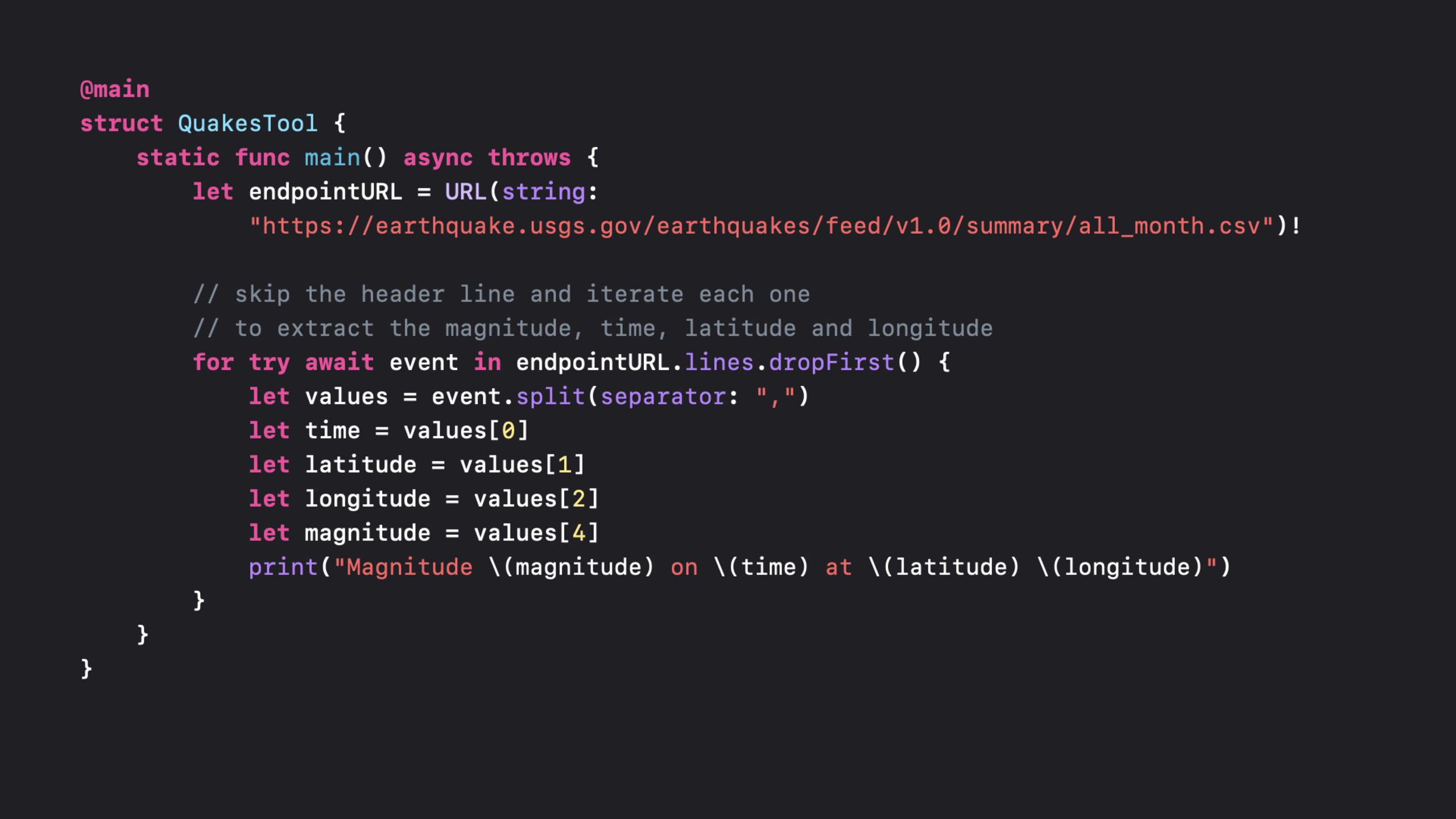
系统框架中大量 API 已经提供了 AsyncSequence 接口。URL.lines 可以逐行异步读取文本文件。URLSession 的 bytes 和 data 方法返回 AsyncBytes。NotificationCenter 新增了 notifications(named:) 方法返回 AsyncSequence。FileHandle 也支持了异步读取。
另外还介绍了 AsyncStream 和 AsyncThrowingStream,这是把传统的 callback/delegate 模式转换为 AsyncSequence 的桥梁。你可以用 AsyncStream 把 Timer、CLLocationManager 的 delegate 回调包装成 AsyncSequence。
值得深挖的点
AsyncStream vs Combine Publisher 的选择
两者功能有大量重叠,但设计哲学不同。AsyncStream 是 pull-based 的——消费者通过 for await 主动拉取元素。Combine 是 push-based 的——生产者推送元素给订阅者。对于「一次处理一个事件」的场景(比如逐行处理文件),AsyncStream 更自然。对于「需要组合多个数据流」的场景(比如 debounce、merge),Combine 仍然更合适。
背压(Backpressure)的处理
AsyncStream 有一个内置的 BufferingPolicy:.unbounded(无限缓冲,可能内存暴涨)和 .bufferingNewest(n)(保留最新的 n 个元素)。如果你的生产者产生数据的速度比消费者处理速度快,选择合适的缓冲策略很重要。对于 UI 事件(比如按钮点击),.bufferingNewest(1) 就够了——用户不需要处理积压的点击事件。
代码片段
// 使用 URL.lines 逐行读取文件
func processLogFile(url: URL) async throws {
    // 异步逐行读取,不需要一次性加载整个文件到内存
    for try await line in url.lines {
        if line.contains("ERROR") {
            let errorEntry = parseErrorLog(line)
            await handleCriticalError(errorEntry)
        }
    }
    print("日志处理完成")
}
// 将 NotificationCenter 转换为 AsyncSequence
func observeNotifications() async {
let notifications = NotificationCenter.default
.notifications(named: UIApplication.didEnterBackgroundNotification)
// 每次收到通知,for await 循环迭代一次
for await notification in notifications {
print("App 进入后台: \(notification.name.rawValue)")
// 处理后台事件
await saveCurrentState()
}
// 理论上这个循环不会结束,除非 task 被取消
}// 用 AsyncStream 包装 delegate 回调
class LocationStream {
let stream: AsyncStream<CLLocation>
private let continuation: AsyncStream<CLLocation>.Continuation
init() {
var cont: AsyncStream<CLLocation>.Continuation!
stream = AsyncStream(bufferingPolicy: .bufferingNewest(1)) { continuation in
cont = continuation
}
self.continuation = cont
}
func yield(location: CLLocation) {
// 从 delegate 回调中产生新元素
continuation.yield(location)
}
func finish() {
continuation.finish()
}
}
// 使用方式
class MapViewModel {
let locationStream = LocationStream()
let manager = CLLocationManager()
func startTracking() async {
// 在 SwiftUI 的 .task 中使用
for await location in locationStream.stream {
updateMap(with: location)
}
}
}
// CLLocationManagerDelegate 中
extension MapViewModel: CLLocationManagerDelegate {
func locationManager(_ manager: CLLocationManager, didUpdateLocations locations: [CLLocation]) {
if let location = locations.first {
locationStream.yield(location: location)
}
}
}最佳实践
不要创建无限缓冲的 AsyncStream(.unbounded 策略)。如果生产者持续产生数据而消费者处理不过来,内存会持续增长。对于大多数场景,.bufferingNewest(1) 或者 .bufferingNewest(5) 就够了。
当 AsyncStream 的消费者被取消时(比如视图消失了),continuation.onTermination 回调会被触发。在这里清理资源(停止 GPS、停止 Timer),避免生产者在没有消费者的情况下持续工作。
还有什么值得关注
AsyncThrowingStream是可以抛出错误的AsyncStream变体,适合网络请求等可能失败的场景。Task.group和AsyncSequence可以组合使用:多个异步任务的结果通过AsyncSequence汇聚。AsyncSequence支持map、filter、reduce等高阶函数,和同步Sequence的用法一致。