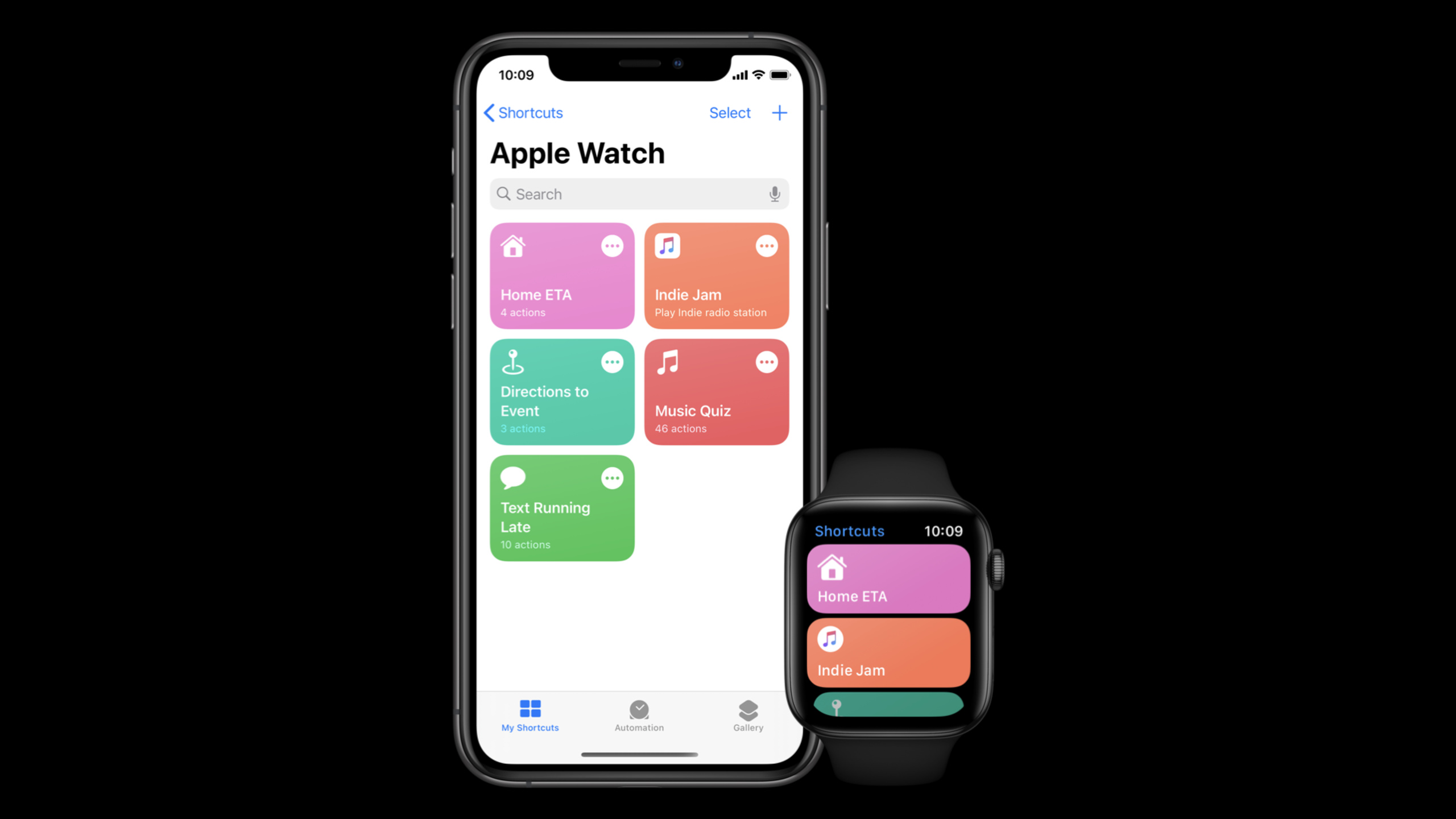
在 watchOS 上用 Shortcuts 创建快速交互
Create quick interactions with Shortcuts on watchOS
2020年6月25日
一句话判断
watchOS 7 让 Shortcuts 成了手表上最高效的交互方式——如果你的应用有”一键完成”的场景,捐赠 Shortcut 是你获得表盘入口的最佳路径。
这场 Session 讲了什么
watchOS 7 引入了完整的 Shortcuts(快捷指令)支持,让用户可以在 Apple Watch 上直接运行 Siri 快捷指令。Session 介绍了如何在你的 iOS 应用中定义和捐赠(donate)Shortcut,让这些快捷操作自动出现在 watchOS 的 Shortcuts 应用和表盘 Complication 中。
核心概念是”交互捐赠”(Interaction Donation)。当用户在你的应用中执行某个操作时,你可以把这个操作”捐赠”给系统,告诉 Siri “用户刚做了一件事,这个操作可能以后还要重复”。系统会根据用户的使用频率自动推荐这个 Shortcut,或者用户可以手动把它添加到 watchOS 的表盘上。
Session 详细介绍了 INInteraction 和 INIntent 的工作流程。你需要定义一个 Intent(描述用户想做什么),创建一个 Interaction(封装具体的操作上下文),然后捐赠给系统。当用户在 watchOS 上触发这个 Shortcut 时,系统会调用你的 IntentHandler 来执行操作并返回结果。
值得深挖的点
Shortcut 的渐进式信息披露
在手表上展示 Shortcut 的结果时,信息要分层:第一眼只看核心结果,点击后展示详情。比如”点咖啡”Shortcut 执行后,表盘上只显示”已下单,预计 5 分钟”,点击后才展示订单详情和预计取餐窗口号。这符合手表的”瞥一眼”交互模式——用户不需要举起手腕看 5 秒钟。
Shortcut 与 Complication 的联动
donated Shortcut 可以直接作为表盘 Complication 出现。这意味着用户不需要打开 Shortcuts 应用,在表盘上就能看到和触发你的快捷操作。这是一个极其强大的入口——手表上最便捷的操作就是”抬腕 + 点击表盘上的一个 Complication”。
代码片段
import Intents

// 定义并捐赠一个点咖啡的 Shortcut
class CoffeeOrderManager {

    func donateOrderShortcut(drink: String, storeId: String) {
        // 创建 Intent
        let intent = OrderCoffeeIntent()
        intent.drink = drink
        intent.storeId = storeId
        intent.suggestedInvocationPhrase = "点一杯\(drink)"  // Siri 建议短语

        // 创建 Interaction 并捐赠
        let interaction = INInteraction(intent: intent, response: nil)
        interaction.donate { error in
            if let error = error {
                print("Shortcut 捐赠失败: \(error)")
            } else {
                print("Shortcut 捐赠成功: 点一杯\(drink)")
            }
        }
    }

    // 在用户完成点单时触发捐赠
    func placeOrder(drink: String, storeId: String) {
        // ... 执行点单逻辑 ...

        // 点单成功后捐赠 Shortcut
        donateOrderShortcut(drink: drink, storeId: storeId)
    }
}
// 实现 IntentHandler 处理来自 watchOS 的 Shortcut 触发
import Intents
class OrderCoffeeIntentHandler: NSObject, OrderCoffeeIntentHandling {
func handle(intent: OrderCoffeeIntent, completion: @escaping (OrderCoffeeIntentResponse) -> Void) {
guard let drink = intent.drink, let storeId = intent.storeId else {
// 缺少参数,需要确认
let response = OrderCoffeeIntentResponse(
code: .failure,
userActivity: nil
)
completion(response)
return
}
// 执行下单操作
OrderService.shared.placeOrder(drink: drink, storeId: storeId) { result in
switch result {
case .success(let order):
// 返回成功响应(watchOS 上会显示)
let response = OrderCoffeeIntentResponse.success(
orderNumber: order.orderNumber,
waitTime: "\(order.estimatedMinutes) 分钟"
)
completion(response)
case .failure:
let response = OrderCoffeeIntentResponse(
code: .failure,
userActivity: nil
)
completion(response)
}
}
}
// 确认 Intent 是否可以执行(可选)
func confirm(intent: OrderCoffeeIntent, completion: @escaping (OrderCoffeeIntentResponse) -> Void) {
// 检查参数是否完整
if intent.drink != nil && intent.storeId != nil {
completion(OrderCoffeeIntentResponse(code: .ready, userActivity: nil))
} else {
completion(OrderCoffeeIntentResponse(code: .failure, userActivity: nil))
}
}
}// 注册 Intent Handler
// 在 Info.plist 中配置支持的 Intent
/*
<key>NSExtension</key>
<dict>
<key>NSExtensionAttributes</key>
<dict>
<key>IntentsSupported</key>
<array>
<string>OrderCoffeeIntent</string>
</array>
</dict>
<key>NSExtensionPointIdentifier</key>
<string>com.apple.intents-service</string>
</dict>
*/
// 在 IntentHandler 入口中路由到正确的 handler
class IntentHandler: INExtension {
override func handler(for intent: INIntent) -> Any {
switch intent {
case is OrderCoffeeIntent:
return OrderCoffeeIntentHandler()
default:
return self
}
}
}最佳实践
- 在用户每次成功执行操作后都捐赠 Interaction,系统的推荐算法依赖捐赠频率
- 为每个 Intent 提供有意义的
suggestedInvocationPhrase,让用户知道可以用什么语音命令触发 - Shortcut 的执行结果要简洁——手表屏幕上最多展示两行核心信息
- 为 Shortcut 配置参数时,提供合理的默认值,减少用户在手表上的输入需求
- 在 watchOS Complication 中展示最常用的 Shortcut,让用户抬腕即可触发
还有什么值得关注
- watchOS 7 的 Shortcuts 应用支持多步骤快捷指令,用户可以串联多个应用的 Shortcut
- Siri 的语音识别在 watchOS 7 中得到了改进,Shortcut 的语音触发成功率更高
- Session 提到了”conversation shortcuts”——通过 Siri 对话逐步收集参数,适合需要多个输入的复杂操作