使用 AVFoundation 和 VideoToolbox 解码 ProRes
Decode ProRes with AVFoundation and VideoToolbox
2020年6月25日
一句话判断
ProRes 视频不再是 Final Cut Pro 的专属,iOS 14 让你可以在 iPhone 和 iPad 上直接解码 ProRes 422 视频流,对于专业视频编辑 App 来说这是关键的底层能力。
这场 Session 讲了什么
Apple 在 iOS 14 中为 AVFoundation 和 VideoToolbox 添加了 ProRes 解码支持。ProRes 是 Apple 的专业视频编解码器家族,广泛用于影视后期制作。过去它只在 macOS 上可用,现在 iOS 和 iPadOS 也能硬件解码 ProRes 422 和 ProRes 422 HQ 视频。
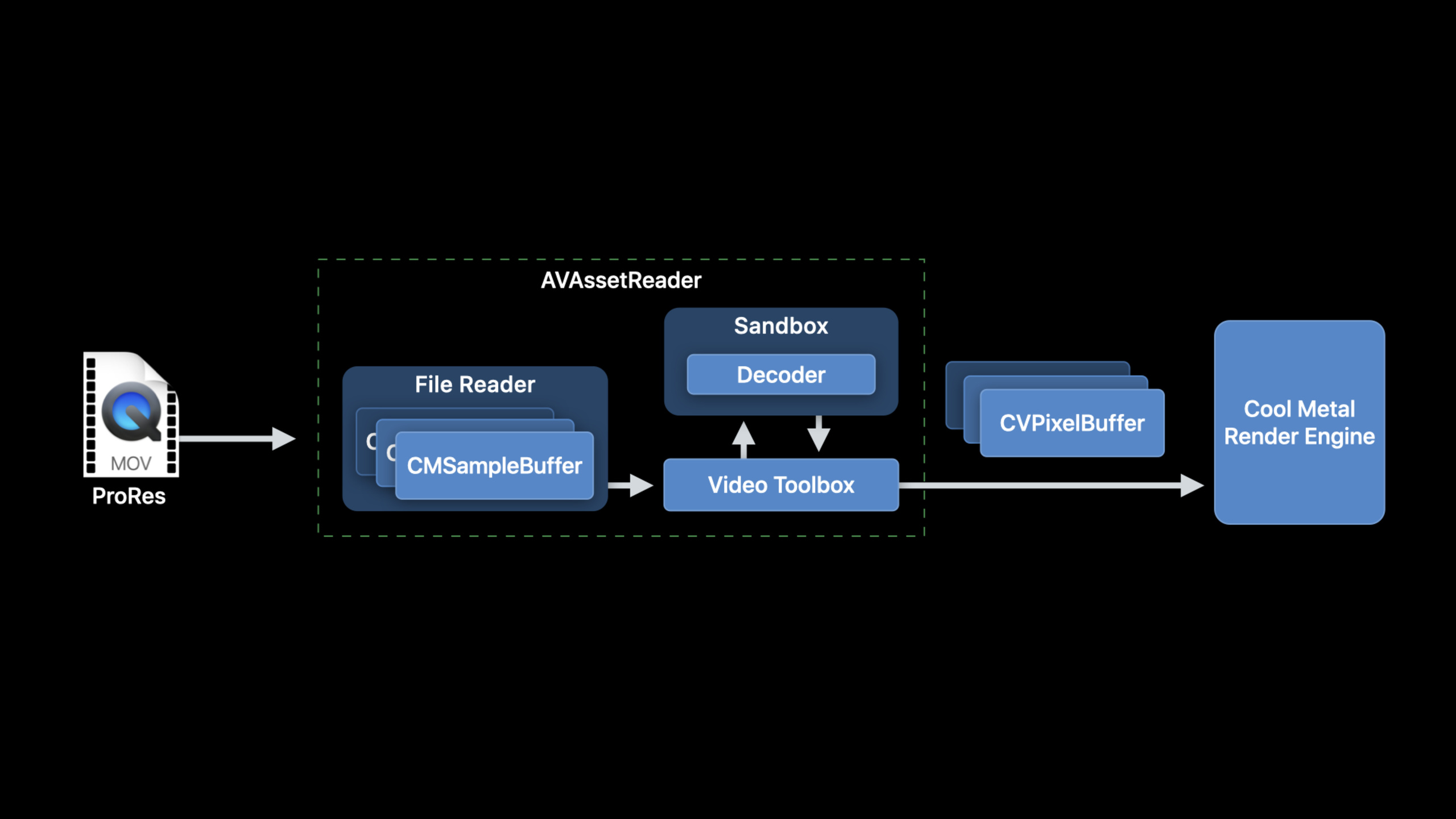
Session 详细介绍了两种解码路径。高级方案是使用 AVFoundation 的 AVAssetReader 直接读取 ProRes 文件的帧数据,适合大多数视频编辑场景。低级方案是使用 VideoToolbox 的 VTDecompressionSession 直接解码 ProRes 的 NAL 单元,适合需要精确控制解码过程的场景,比如自定义的硬件加速管线。Session 还讨论了性能考量——ProRes 码率很高,需要合理管理内存和解码队列。
值得深挖的点
ProRes 的特点与适用场景
ProRes 之所以在专业影视领域广泛使用,是因为它是一种视觉无损的中间编解码格式。与 H.264/H.265 不同,ProRes 不使用帧间压缩,每一帧都是独立编码的(Intra-frame only)。这意味着精确帧编辑不会出现解码伪影,但代价是文件体积很大。ProRes 422 的典型码率在 4K 下约 500Mbps。在 iOS 上硬件解码意味着 CPU 和内存占用可控,但你仍然需要考虑存储 I/O 的压力。
AVFoundation 与 VideoToolbox 的选择
AVAssetReader 提供了开箱即用的解码流程——你只需要指定输出格式,它会处理好解复用和解码。但它的灵活性有限。VideoToolbox 的 VTDecompressionSession 给你完全的控制权——你可以自定义输出格式、管理解码队列、甚至将解码结果直接传给 Metal 纹理。如果你的 App 需要做实时视频特效处理,VideoToolbox + Metal 的组合是更好的选择。
代码片段
使用 AVAssetReader 读取 ProRes 视频帧
场景:从 ProRes 文件中逐帧读取并显示。
import AVFoundation

class ProResReader {
    private var assetReader: AVAssetReader?
    private var trackOutput: AVAssetReaderTrackOutput?

    func startReading(url: URL) {
        let asset = AVAsset(url: url)

        // 创建 AssetReader
        guard let reader = try? AVAssetReader(asset: asset) else {
            print("无法创建 AssetReader")
            return
        }
        self.assetReader = reader

        // 获取视频轨道
        guard let videoTrack = asset.tracks(withMediaType: .video).first else {
            print("未找到视频轨道")
            return
        }

        // 设置输出格式为 ProRes 支持的像素格式
        let outputSettings: [String: Any] = [
            kCVPixelBufferPixelFormatTypeKey as String: kCVPixelFormatType_420YpCbCr8BiPlanarVideoRange
        ]

        let output = AVAssetReaderTrackOutput(
            track: videoTrack,
            outputSettings: outputSettings
        )
        output.supportsRandomAccess = true  // 支持随机访问帧

        reader.add(output)
        reader.startReading()
        self.trackOutput = output

        // 读取第一帧
        readNextFrame()
    }

    func readNextFrame() {
        guard let sampleBuffer = trackOutput?.copyNextSampleBuffer() else {
            print("读取完成或出错")
            return
        }

        // 获取解码后的像素缓冲区
        if let pixelBuffer = sampleBuffer.imageBuffer {
            let width = CVPixelBufferGetWidth(pixelBuffer)
            let height = CVPixelBufferGetHeight(pixelBuffer)
            print("读取帧: \(width)x\(height)")

            // 将 pixelBuffer 转为 CIImage 或 MTLTexture 进行处理
            let ciImage = CIImage(cvPixelBuffer: pixelBuffer)
            // 后续处理...
        }
    }
}
使用 VideoToolbox 直接解码 ProRes
场景:构建自定义的 ProRes 解码管线。
import VideoToolbox

class ProResDecoder {
    private var decompressionSession: VTDecompressionSession?

    func setupDecoder(formatDescription: CMFormatDescription) {
        // 设置解码输出参数
        var destinationAttributes: [String: Any] = [
            kVTDecompressionResolutionKey as String: 1.0,  // 原始分辨率
        ]

        // 创建解码会话
        let status = VTDecompressionSessionCreate(
            allocator: nil,
            formatDescription: formatDescription,
            decoderSpecification: nil,  // 使用系统默认的 ProRes 解码器
            destinationImageBufferAttributes: destinationAttributes as CFDictionary,
            outputCallback: nil,  // 使用异步回调
            decompressionSessionOut: &decompressionSession
        )

        if status != noErr {
            print("创建解码会话失败: \(status)")
        }
    }

    // 异步回调版本的解码
    func setupDecoderWithCallback(formatDescription: CMFormatDescription) {
        var callbackRecord = VTDecompressionOutputCallbackRecord()
        callbackRecord.decompressionOutputCallback = {
            (outputCallbackRefCon, sourceFrameRefCon, status, infoFlags, imageBuffer, presentationTimeStamp, duration) in

            guard status == noErr, let imageBuffer = imageBuffer else {
                print("解码失败: \(status)")
                return
            }

            // imageBuffer 是解码后的 ProRes 帧
            // 可以直接用于显示或进一步处理
            let ciImage = CIImage(cvImageBuffer: imageBuffer)
            print("解码成功: \(ciImage.extent)")
        }
        callbackRecord.decompressionOutputRefCon = nil

        VTDecompressionSessionCreate(
            allocator: nil,
            formatDescription: formatDescription,
            decoderSpecification: nil,
            destinationImageBufferAttributes: nil,
            outputCallback: &callbackRecord,
            decompressionSessionOut: &decompressionSession
        )
    }

    func decodeFrame(sampleBuffer: CMSampleBuffer) {
        guard let session = decompressionSession else { return }

        var infoFlags = VTDecodeInfoFlags()
        let status = VTDecompressionSessionDecodeFrame(
            session,
            sampleBuffer: sampleBuffer,
            flags: [],
            sourceFrameRefCon: nil,
            infoFlagsOut: &infoFlags
        )

        if status != noErr {
            print("解码帧失败: \(status)")
        }
    }
}
检测设备是否支持 ProRes 解码
场景:在 App 启动时检查硬件解码能力。
import VideoToolbox

func checkProResSupport() -> Bool {
    // 检查 VideoToolbox 是否支持 ProRes 解码
    let proResCodecTypes: [CMVideoCodecType] = [
        kCMVideoCodecType_AppleProRes422,
        kCMVideoCodecType_AppleProRes422HQ,
        kCMVideoCodecType_AppleProRes422LT,
        kCMVideoCodecType_AppleProRes422Proxy,
        kCMVideoCodecType_AppleProRes4444
    ]

    for codecType in proResCodecTypes {
        let isSupported = VTIsHardwareDecodeSupported(codecType)
        print("ProRes 编解码器 \(codecType): \(isSupported ? "支持" : "不支持")")
        if isSupported {
            return true
        }
    }
    return false
}
最佳实践
已有项目:如果你在做视频编辑 App,检查是否已经使用 AVAssetReader 处理视频。ProRes 支持是透明的——只要设备支持硬件解码,你不需要改代码。但建议添加设备能力检测,在不支持的设备上给出提示。
新项目:从架构层面就考虑 ProRes 支持。使用 AVAssetReader 作为默认解码路径,它已经能处理大多数场景。只在需要极致性能控制时才使用 VideoToolbox。注意 ProRes 文件很大,确保你的内存管理策略能处理高码率场景。
还有什么值得关注
- ProRes 编码(Encoding)仍然只在 macOS 上支持,iOS 14 只支持解码。
- 在 iPad Pro 上解码 ProRes 422 HQ 4K 视频可以实时完成,适合作为移动端视频审片工具。
- 建议配合 AVAssetImageGenerator 来生成缩略图,它也支持 ProRes 格式。