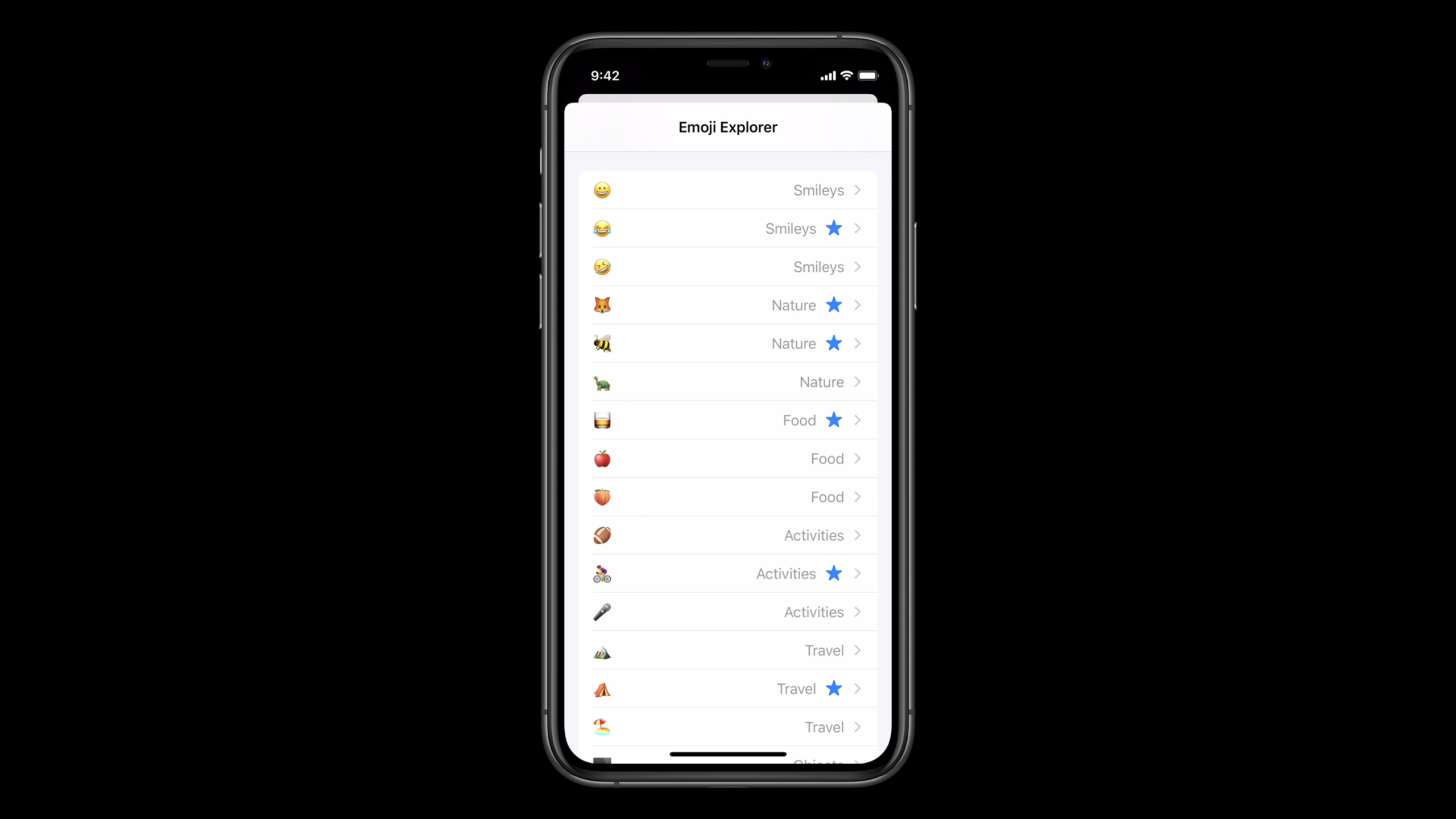
UICollectionView 中的列表布局
Lists in UICollectionView
2020年6月26日
一句话判断
UICollectionView 终于有了原生的高性能列表支持——UICollectionViewListCell 配合 Compositional Layout 可以让你不再需要 UITableView 和 UICollectionView 两套代码,统一用 Collection View 搞定一切。
这场 Session 讲了什么
iOS 14 为 UICollectionView 引入了完整的列表支持。核心是三个新类型:UICollectionLayoutListConfiguration(列表布局配置)、UICollectionViewListCell(列表专用 Cell)、以及 UIListContentConfiguration(列表内容配置)。
过去如果你想用 UICollectionView 实现类似 UITableView 的列表效果,需要大量自定义布局代码。现在通过 UICollectionLayoutListConfiguration,你可以一行代码创建列表布局,并且自动获得系统原生的滑动行为(如 swipe actions、pull to refresh、accessory views)。
Session 还介绍了如何混合使用列表布局和其他 Compositional Layout——同一个 Collection View 中可以同时包含列表区域和网格区域,这在很多真实 App 场景中非常实用。
值得深挖的点
List Configuration 与 Compositional Layout 的融合。 列表布局本质上是一种特殊的 Compositional Layout Section。这意味着你可以在同一个 Collection View 中创建多个 Section,每个 Section 使用不同的布局——顶部用横滑卡片,中间用列表,底部用网格。这种混合布局在过往需要极其复杂的自定义 Layout,现在只需配置即可。
Swipe Actions 的原生支持。 过去实现列表滑动操作(如左滑删除)需要自己处理手势和动画。UICollectionViewListCell 原生支持 UISwipeActionsConfiguration,配置方式和 UITableView 一致,但可以和 Collection View 的其他特性(如 Drag & Drop)无缝配合。
代码片段
import UIKit

// 创建列表布局
var configuration = UICollectionLayoutListConfiguration(appearance: .insetGrouped)
configuration.backgroundColor = .systemGroupedBackground

// 配置滑动操作
configuration.leadingSwipeActionsConfigurationProvider = { indexPath in
    let action = UIContextualAction(
        style: .normal,
        title: "收藏"
    ) { _, _, completion in
        // 处理收藏操作
        completion(true)
    }
    action.backgroundColor = .systemBlue
    return UISwipeActionsConfiguration(actions: [action])
}

let layout = UICollectionViewCompositionalLayout.list(using: configuration)
// 自定义 List Cell
class MessageListCell: UICollectionViewListCell {
override func updateConfiguration(using state: UICellConfigurationState) {
// 使用新的 Cell Configuration API
var content = defaultContentConfiguration().updated(for: state)
content.text = "消息标题"
content.secondaryText = "消息摘要"
content.image = UIImage(systemName: "envelope")
content.imageProperties.tintColor = .systemBlue
// 自定义外观
content.textProperties.font = .preferredFont(forTextStyle: .headline)
content.secondaryTextProperties.font = .preferredFont(forTextStyle: .subheadline)
content.secondaryTextProperties.color = .secondaryLabel
contentConfiguration = content
}
}// 在 Diffable Data Source 中注册和使用 List Cell
let cellRegistration = UICollectionView.CellRegistration<MessageListCell, Message> { cell, indexPath, message in
var content = cell.defaultContentConfiguration()
content.text = message.title
content.secondaryText = message.preview
content.image = message.isRead ? nil : UIImage(systemName: "circle.fill")
cell.contentConfiguration = content
// 配置 accessory
cell.accessories = [.disclosureIndicator()]
if !message.isRead {
cell.accessories.append(.customView(systemItemView: .init(image: UIImage(systemName: "circle.fill"))))
}
}最佳实践
- 用 UICollectionView 替代 UITableView。 列表布局让 Collection View 覆盖了 UITableView 的所有使用场景,同时保留了 Collection View 的灵活性。
- 优先使用 Cell Configuration 而非手动添加 Subview。
defaultContentConfiguration()提供了标准的列表 Cell 样式,自动适配深色模式、Dynamic Type 等。 - 混合布局时为每个 Section 独立配置。 用
UICollectionViewCompositionalLayout的 section provider 为不同 Section 创建不同布局。 - Swipe Actions 配合 background 配置使用。 列表支持
.insetGrouped、.sidebar等多种外观风格,选择与你的 App 设计匹配的样式。
还有什么值得关注
.sidebar外观风格专为 iPadOS 的侧边栏设计,自动适配系统样式- 列表 Cell 支持原生的 reorder 控件和拖拽排序
- Cell Configuration 的 state 机制可以自动处理选中、高亮等状态
- 配合 Diffable Data Source 使用可以实现高效的列表更新动画